 Videnda

Day01
MorningMeiji Shrine
AfternoonNezu Museum
EatDen
EveningShibuya Crossing
When your device requests reduced motion, decorative motion remains disabled.
For iPhone & iPad
A travel bucket list that works like a passport.
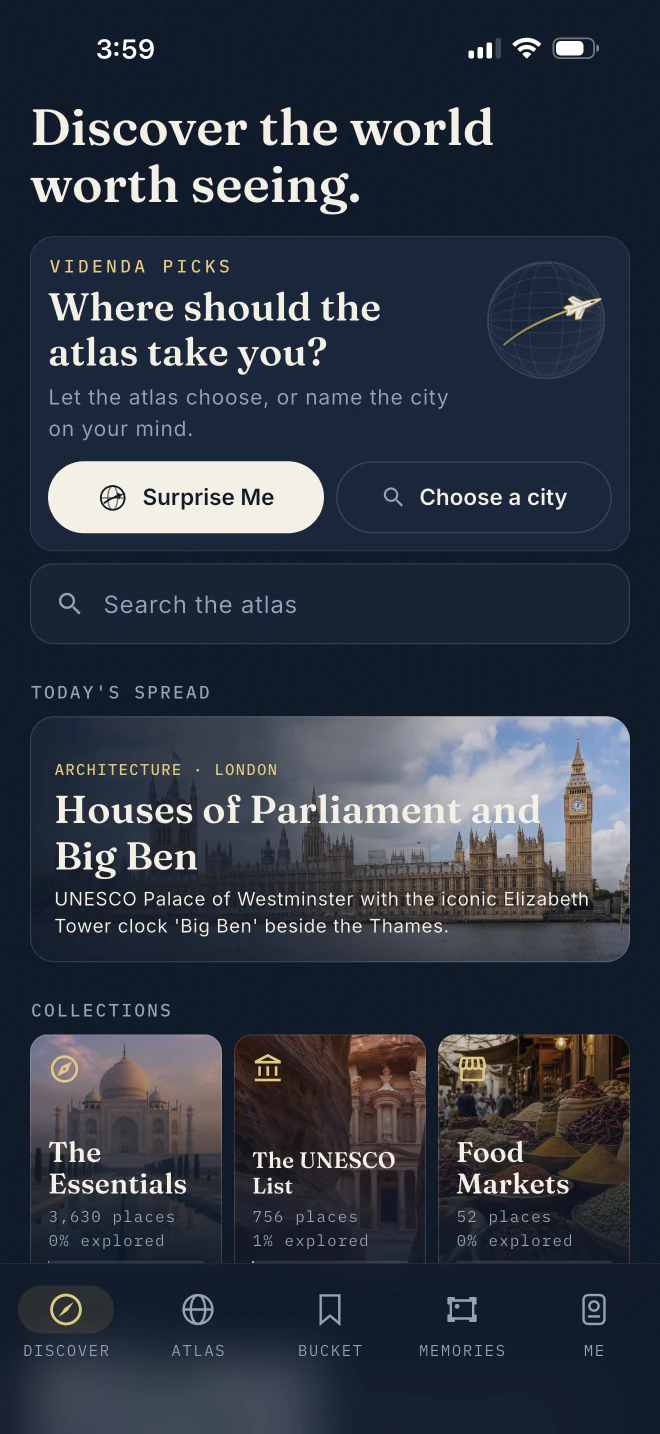
Explore 23,800 remarkable places across 190 countries, from wonders and museums to beaches, dishes, and views. Every entry begins with AI-assisted research and is reviewed by an editor. Mark where you’ve been, stamp what you’ve seen, and keep a private journal of the places that matter to you.
New in 1.2 Atlas Draw chooses the place. A three-day Expedition gives the trip shape without filling every hour. See the draw →
New in 1.1 Videnda Press turns your journal into a book, carousel, or short film. See it below →








How it works
Kyoto, April 2026 · Real entries from the catalogue
01 · Search
Search for a shrine, a painting, or a dish. Results are instant because the full catalogue lives on your phone. Every entry is numbered like a ledger and carries its own engraved plate.
Real entries · № 0933 and № 0003
02 · Atlas Draw
Not sure where to go next? Let the atlas choose for you. The globe spins and lands on one destination from the offline catalogue.
One committed result · No network · No endless shuffle
03 · Expedition
Videnda turns the chosen city into a flexible three-day plan, with ideas for each morning, afternoon, meal, and evening. It gives the trip shape while leaving room to change your mind.
Three days · Twelve catalogue places · Edit anything
04 · The manifest
Save a place with one tap and it joins your manifest, the list of what you still want to see. No account, no sync, no waiting.
05 · The ceremony
After you visit a place, stamp it. The seal lands with a thunk and prints the date on the page. Your first stamp in a new country opens a new passport page.
Keep scrolling. The stamp knows when to land.
06 · The journal
Add a photo and a field note in your own words. Memories gathers each arrival into a journey that stays on your device and remains easy to revisit years later.
07 · The passport
The passport keeps count of your stamps, countries, and wonders. The world map fills with brass, one continent at a time. Nothing leaves your device.
The Me tab is always the navy passport
08 · Where should I eat?
Find famous dishes and storied restaurants nearby, sorted by distance even in airplane mode. The Kyoto list includes restaurants with histories spanning four centuries.
Real entries · Distances illustrative
09 · Videnda Press
When the journey ends, turn the journal into a typeset book, a social carousel, or a short film. Everything is composed on your device, and nothing is uploaded. The finished keepsake belongs to you.
New in Videnda 1.1 · Book, carousel & film
The end of the demo
The atlas, stamps, and journal you just explored are ready on your phone. Download Videnda and make the passport your own. We’ll keep the ink ready.

$9.99 once. Yours for good.
No subscription. No account. No tracking.Also in the atlas
All of it on-device
Your stamps gather into journeys, with each trip mapped, dated, and named.
Turn a finished journal into a typeset book, social carousel, or short film. Everything is composed on your device.
Your latest stamp and travel count are always a glance away on the Home Screen or Lock Screen.
Each morning, Videnda brings back an arrival from the same date in your journal.
Find famous dishes and storied restaurants nearby, sorted by distance even in airplane mode.
Spin the globe when you want somewhere unexpected. The atlas chooses one place and commits to it.
Turn a city into three flexible days of mornings, afternoons, meals, and optional evenings. Change any part you like.
Ask Siri to surprise you, stamp a place, open your passport, or find somewhere to eat.
Search the curated atlas and your own journal straight from the Home Screen. Everything is indexed on your device.
Private by default
Videnda was built to keep your travels private. We run no servers. Your passports, stamps, and journals stay on your iPhone unless you choose to create and move a backup.
Before each release, we scan the app for network code, including HTTP clients, sockets, and analytics SDKs. Nothing ships until the count is zero. Videnda connects only when you ask it to: tapping a web link opens your browser, and sharing opens the system share sheet. The App Store privacy label reads Data Not Collected, and we work to keep it that way.
Read the privacy policyThe whole policy fits on one page because privacy should be easy to understand.
Before you pack
Videnda keeps accounts, privacy, and ownership simple.
Under a minute. The first screen is a world map. Tap the countries you have visited, pencil in a few places, and stamp your first memory. If you already keep a journal, you can restore it from the welcome screen.
Yes. The catalogue, atlas, bucket list, stamps, and journal work without a connection. Web links and sharing use the system only when you choose them.
No. Videnda opens with a local Traveller profile. Any named or password-protected passports stay on your device.
No. Videnda has no analytics, ads, tracking, or connection to a Litora Labs server. Apple may include the app’s data in your device backups, depending on your settings.
No. Videnda costs $9.99 once. Every feature is included, with no subscription or in-app purchases.
We begin with AI-assisted research, then review each entry and organize the catalogue by country, category, and editorial tier.
Videnda is designed for iPhone and iPad.
Yes. You can create a backup, export your journal as files, and restore it later. Videnda creates an export only when you ask, and you choose where it goes.
The studio
Litora Labs LLC is an independent software studio founded in 2026. We make carefully designed iPhone apps that are small in scope and private by default.
Litora means “shores” in Latin. We make software for the parts of life that happen away from a desk.
Contact
Questions, support, or anything else? We read every message and reply ourselves.
info@litoralabs.comWant a note when something ships? Ask for release notes. We send one short email per release, and you can unsubscribe by replying.


.jpg)


.jpg)


.jpeg)